


Get security briefings from the Threat Research Team
New campaigns, attacker techniques, and detection guidance — straight to your inbox.

Falco Feeds extends the power of Falco by giving open source-focused companies access to expert-written rules that are continuously updated as new threats are discovered.
If you use Amazon Elastic Kubernetes Service (Amazon EKS) Auto Mode, you benefit from AWS-managed infrastructure, but you still need runtime security for your workloads. Amazon EKS Auto Mode lets AWS run your Kubernetes cluster infrastructure: compute, networking, storage, load balancing, and node patching. That removes a lot of toil. Because AWS operates the nodes for you in a managed model, nodes are identical, predictable, and immutable, with read-only root filesystems and strict security controls. This post covers what that means for runtime security, and how to deploy and use Sysdig Secure with EKS Auto Mode using Universal eBPF.
What changes with Amazon EKS Auto Mode
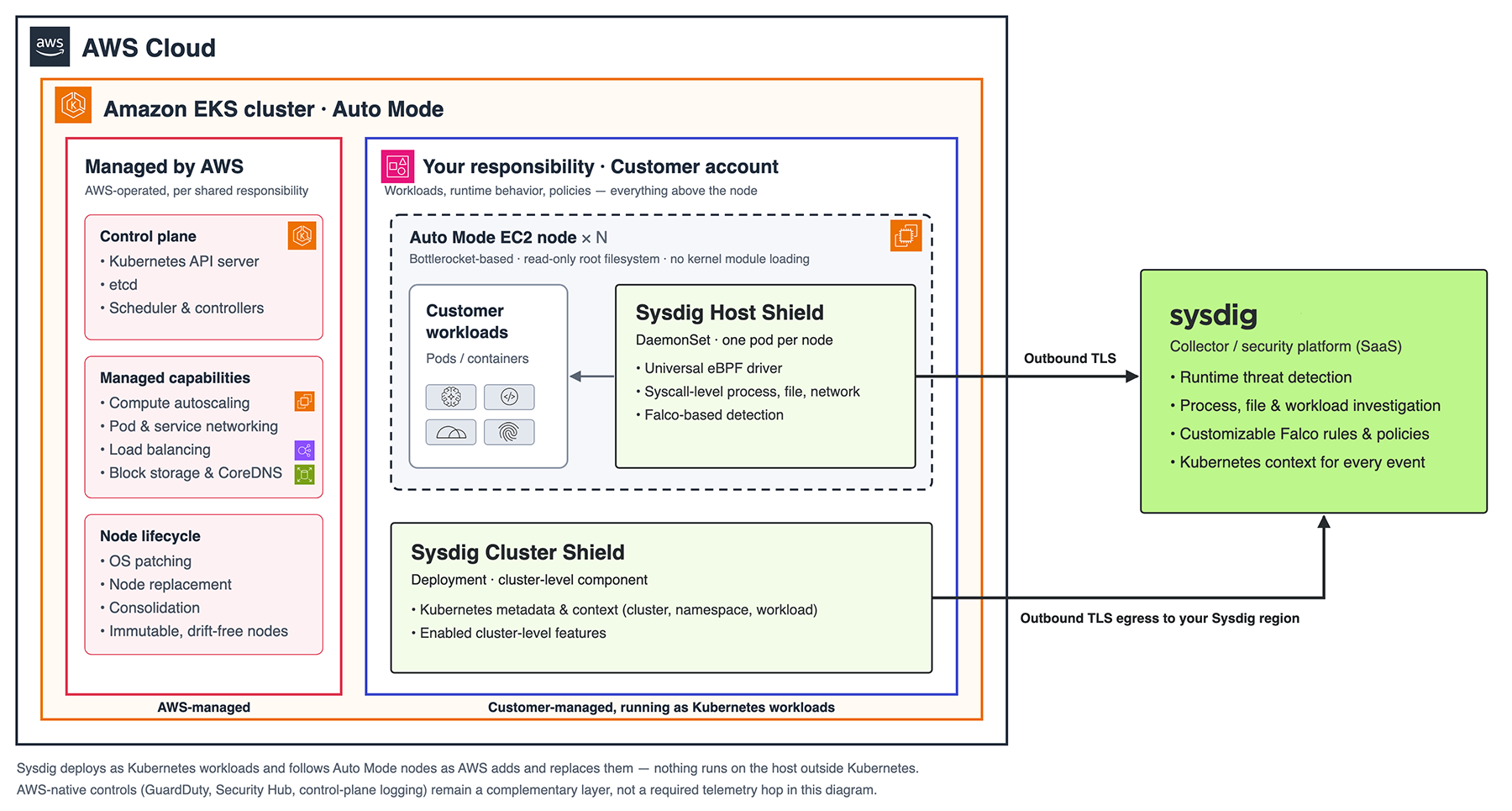
With standard EKS, AWS manages the control plane, and you manage the worker nodes. Auto Mode extends AWS's responsibility to the nodes and the core cluster capabilities:
- Compute provisioning, autoscaling, andconsolidation
- Pod and service networking, and load balancing
- Block storage integration and CoreDNS
- Node patching, replacement, and lifecyclemanagement
Nodes are AWS-managed appliances: a locked-down, container-focused OS (Bottlerocket-based) with a read-only root filesystem and SELinux enforcement. Nodes are replaced regularly, so they never drift. See the Auto Mode documentation for the full list of managed components.
Shared responsibility still applies
AWS's security guidance for Auto Mode and best practices cover the AWS side. This post covers the last row: what happens inside your workloads at runtime.
Why Auto Mode needs a different agent approach
Auto Mode nodes don't allow kernel module loading for security reasons. Because Bottlerocket fully supports eBPF (Extended Berkeley Packet Filter), Sysdig uses eBPF as the primary mechanism for runtime security. A Universal eBPF driver embedded in the Sysdig Host Shield (agent) enables a real-time approach to monitoring system activity safely within the kernel using system calls as a source of truth.
Learn more about kernel-level security monitoring.
Getting started
Sysdig deploys as a Kubernetes workload, so it follows Auto Mode nodes as AWS adds and replaces them. Nothing runs on the host outside Kubernetes.
Follow these steps to get set up:
- Create an Auto Mode cluster, or enable Auto Mode on an existing one, and connect with
kubectl. - Get your Sysdig access key and region from your Sysdig Secure tenant. Keep the key in a Kubernetes Secret, not in manifests.
- Install Sysdig with Universal eBPF. Use the Kubernetes onboarding workflow in Sysdig Secure (Host Shield for node-level protection, Cluster Shield for cluster-level components), and set:
host:
  driver: universal_ebpf
(See Understand Agent Drivers for requirements.)
- Make sure egress allows the Sysdig collector endpoints for your region.
- Verify. Run the following and confirm the active driver is Universal eBPF, and that events and Kubernetes metadata appear in Sysdig Secure.
kubectl get pods -n <sysdig-namespace> -o wide # one Host Shield pod per node
- Trigger a detection in a non-production namespace, such as a shell in a pod or a file written to a monitored path, and watch it appear in Secure with cluster, namespace, and workload context.
- Test node churn. Scale a workload out, let Auto Mode consolidate, and confirm new nodes pick up a Host Shield pod and keep reporting.
Where Sysdig complements AWS-native controls
Amazon GuardDuty, AWS Security Hub, EKS control-plane logging, network policies, and Pod Security Standards are recommended in an Auto Mode design. They cover the AWS and control-plane layers. Sysdig complements these controls with in-depth cloud workload protection. With Sysdig, security teams can apply runtime policies, investigate process activity, monitor file and workload behavior, and correlate events with Kubernetes context.
Customizable detection rules are built on the industry-leading Falco engine. It allows you to monitor system calls to identify errant or suspicious events at the Linux kernel level. You can use the default threat detection rules in Sysdig Secure or easily customize rules to work with your unique threat model.
The dynamic, short-lived nature of container workloads in a Kubernetes environment means static scanning and other traditional security measures may not detect threats that emerge at runtime. You need runtime security-the ability to monitor behavior in real time to quickly identify and address security issues for workloads running on Amazon EKS Auto Mode. For example, a compromised container might spawn an unexpected process or open a network connection that no vulnerability scanner would flag in advance. Runtime monitoring catches that behavior as it happens, with full Kubernetes context such as cluster, namespace, and workload identity.
We recommend proper posture management, including thorough container vulnerability scanning. Runtime security adds an extra layer of defense against exploits that static analysis or vulnerability scanners may miss, such as zero-days. Runtime security matters for modern organizations because it helps protect workloads and data from unauthorized access, malicious or unintentional changes, and suspicious behavior that could indicate an attack.
Try Amazon EKS Auto Mode with Sysdig
The fastest proof of value is a small EKS Auto Mode cluster with Sysdig on Universal eBPF. Check that core detections and Kubernetes context work, then test the response and investigation workflows that matter to your team. Ready to get started? You can request a demo, check out the installation docs, or read more about Sysdig for Kubernetes here: Runtime-Driven Security for Containers & Kubernetes — A Practitioner’s Toolkit.

Cloud Security for Amazon Web Services
Learn about the key requirements and capabilities for securing AWS cloud services and containers.

Blog: Closing the cloud security gap with runtime security
Get insights into how runtime catches what shift left can't.
AWS Cloud Defense with Sysdig
Cloud defense for AWS powered by runtime insights.
Attackers Move at Machine Speed. Do You?
Explore how leading teams are shifting from manual effort to machine-speed defense — covering the limits of vulnerability management, the rise of runtime detection, AI/ML in production, and the future of automated identity enforcement.