What Is Infostealer Malware? [+ Examples & Protection Tips]
Infostealer malware is malicious software that harvests sensitive data from an infected device and sends it to an attacker.
It targets saved passwords, browser cookies, session tokens, and cryptocurrency wallets. The theft often completes in seconds. Attackers then sell the stolen data, called a log, in criminal marketplaces.
%201.svg)


- In seconds, and usually without a trace, infostealer malware harvests credentials, session cookies, and other sensitive data and sends it to an attacker.
- The malware itself is usually gone fast. It runs in memory and often deletes itself, so endpoint scans can miss it entirely.
- Stolen session cookies are the real problem. They can bypass MFA and keep working after a password reset, so a reset alone rarely locks the attacker out.
- A stolen log is a starting point, not an endpoint. Credentials get resold and become valid logins into cloud and SaaS environments, feeding ransomware and cloud breaches.
- Prevention lowers exposure, but the durable defense is detecting stolen-identity misuse in real time.

What does infostealer malware steal?
The short answer: infostealer malware steals anything on a device that has value to an attacker and can be resold.
But that covers a lot of ground. So it helps to break the theft into categories. Each one serves a different purpose once the data leaves the machine.
Start with credentials.
Saved usernames and passwords are the primary target. That includes browser-stored logins. It also covers server passwords, secret keys, and backup codes for two-factor authentication.
Next is browser data.
Infostealers pull browsing and search history. They also collect autofill entries. Which means saved form data like names, addresses, and payment card details.
Then there are session cookies and authentication tokens.
The most valuable part of the haul. A session cookie is proof that a user already logged in and cleared any multi-factor check. An attacker who steals a valid cookie can sometimes reuse that session. No password required. And no new MFA prompt to trigger. That single detail is why changing a password does not always end the problem. More on that shortly.
The theft rarely stops at logins.
Infostealers also target cryptocurrency wallets and private keys. They scan documents and text files for financial and corporate data. Some capture screenshots of the desktop. Many also collect system details, such as the operating system, IP address, and device metadata.
That last category is easy to overlook.
But system and device information helps an attacker impersonate the victim more convincingly later.
Put it together and a single infection doesn't expose one account. It exposes a full identity profile. Passwords, active sessions, financial keys, and the context needed to use them.
How does infostealer malware work?
Most infostealers follow the same basic sequence:
Run on the device → Collect the valuable data → Send it out → Remove itself
The whole process can finish in seconds. That speed is central to how these tools work.
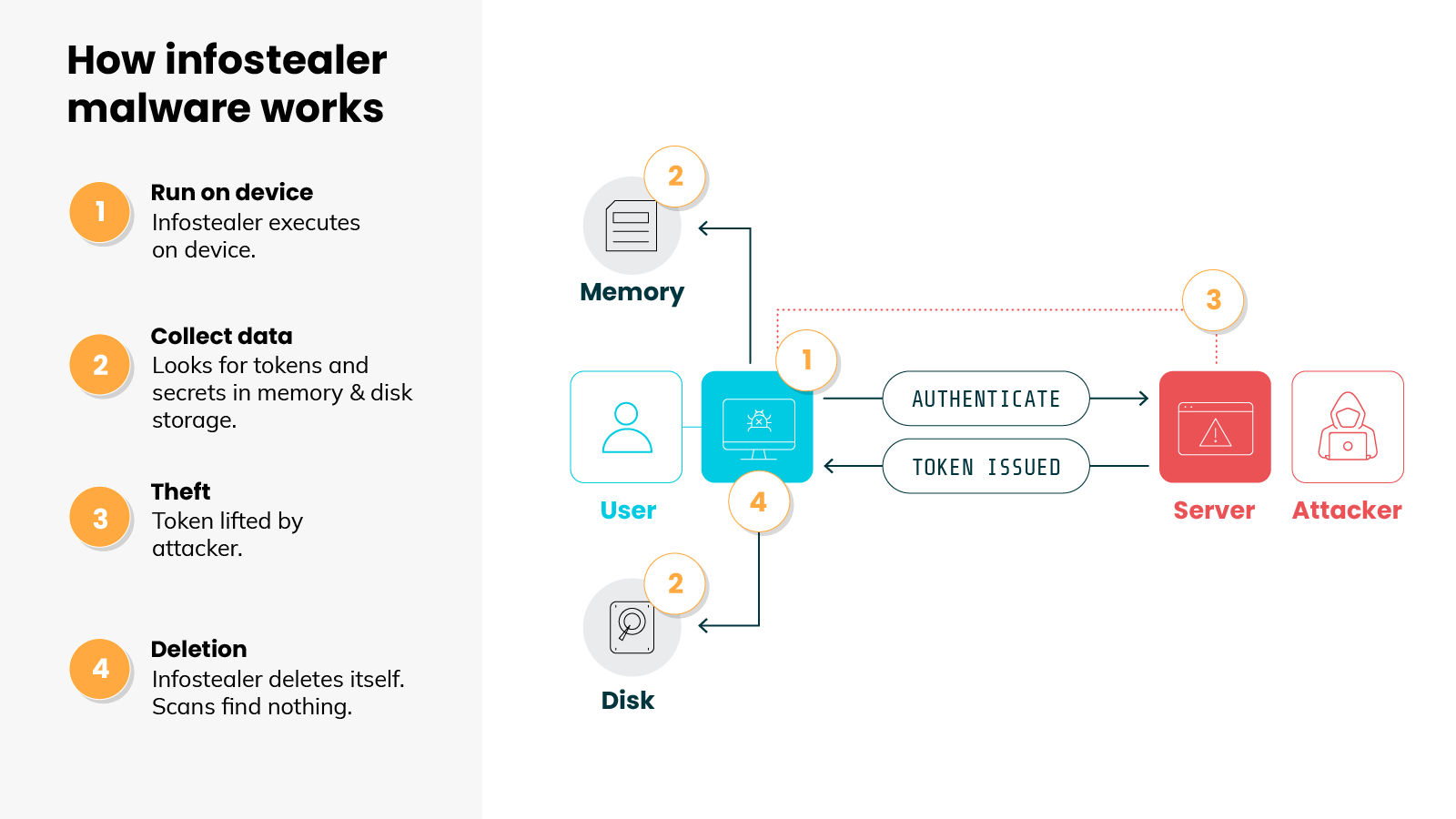
That last step is what makes infostealers so hard to stop.
Think about what an endpoint tool is actually up against. The malware runs briefly, leaves almost nothing on disk, and then erases itself. So a scan that runs afterward may turn up nothing at all. The device looks clean, but the credentials and cookies are already gone.
That's the real problem with catching infostealers on the device. By the time anyone looks, the stolen data has already left the machine, and it stays useful long after the infection ends.
How does infostealer malware spread?
Infostealer malware spreads mostly through everyday user actions, not software exploits. Someone downloads a cracked program, clicks a poisoned search result, or follows a fake prompt, and runs the malware themselves without realizing it.
Most infostealers don't rely on a software exploit. They rely on the user.
In other words: the person is usually tricked into running the malware themselves. No advanced attack required, just a convincing prompt or a trusted-looking download.
The delivery methods have evolved, but the ones that define how infostealers spread today fall into a few main categories.
- ClickFix and fake CAPTCHAs
This is one of the most common current techniques. A website shows a fake error message or CAPTCHA and asks the user to prove they're human. To do that, they're told to copy a command and paste it into a system prompt, often the Run box on Windows. That command quietly downloads and runs the infostealer, and the infection is complete before the user realizes anything happened. - Poisoned search results and ads
Attackers also reach people directly through search. With SEO poisoning, they push malicious pages high in the results, often planted on legitimate or poorly maintained websites. With malvertising, they buy fake ads for common downloads like a browser update. Both routes lead to a page that serves the stealer. - Cracked and pirated software
Attackers frequently bundle infostealers inside pirated programs and keygens. The user gets the tool they wanted, plus the malware that came with it. - macOS payloads
This is no longer a Windows-only problem. The same delivery pages now serve macOS versions too. On a Mac, the trick often ends with a command pasted into Terminal, or a malicious script the user is told to run.
Notice what these methods share. Nearly every one depends on a normal-looking action by the user: a search, a download, a routine prompt. That's what makes this delivery so hard to filter with tooling alone. One click on an unmanaged device can be enough.
Why isn't a password reset enough to stop an infostealer?
A password reset isn't enough because the password isn't the only thing an infostealer takes. It also steals session cookies that can bypass MFA and keep working after the reset, so the attacker often keeps access anyway.
Let's say you discover an infection, so you reset the password. That's a reasonable first move. But on its own it often doesn't lock the attacker out.
Here's why.
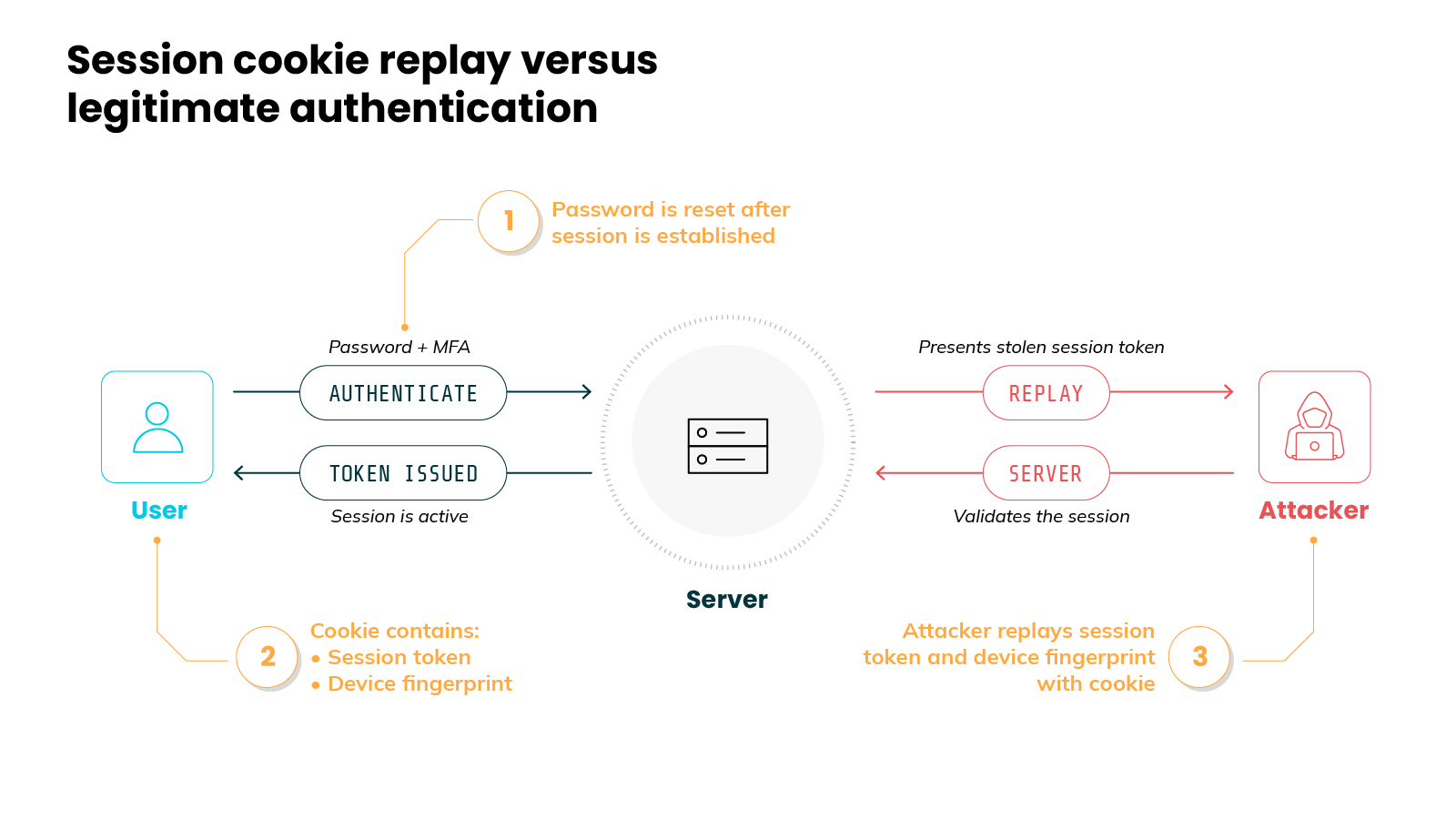
The password isn't the only thing the malware took. Infostealers also steal session cookies and authentication tokens.
A live session cookie is a bearer token. It stands in for an already-authenticated session, MFA included, so whoever holds it is trusted without proving anything again. Steal the cookie and you inherit the session.
Now consider what that means for an attacker…
A stolen cookie represents an authenticated session.
So reusing it can skip the login entirely. No password needed. And no new MFA prompt to trigger. Stealing session cookies is recognized as its own technique in the MITRE ATT&CK framework.
This is the part people miss.
A session cookie is separate from the password. In many systems, changing the password doesn't automatically end open sessions. Which means the stolen cookie can keep working after the reset.
Plus, there's a second problem.
Infostealers also copy the device fingerprint and other identifying data. Attackers can replay that data to look like the original user. So a risk-based login system may not flag the session as unusual. The access looks legitimate.
So what actually closes the gap?
You have to invalidate the active sessions. Not just rotate the password. That means signing out of all sessions and expiring the stolen tokens. Short session lifetimes help. And so does phishing-resistant MFA, like a passkey.
Here's the takeaway.
A password reset addresses the credential you know about. It doesn't address the live access the attacker already holds. Which is why an infostealer infection is better treated as an identity incident. Not just a malware cleanup.
How do infostealers lead to ransomware and cloud breaches?
Infostealers lead to ransomware and cloud breaches by handing attackers valid credentials. Those stolen logins get resold, then used to walk straight into cloud and corporate systems, which sets up everything that follows.
Here's the part most people miss.
When an infostealer finishes its work, the attack isn't over. It's barely started. That log full of stolen credentials has resale value, so it gets sold. The infection was never the goal. It was step one.
Follow it from there and a clear story takes shape:
The stolen credentials land in a resale market.
Some buyers are ransomware operators. Others are initial access brokers, and their whole business is breaking in, then selling that access to whoever wants it. So the work gets split. One crew harvests the credentials. Another buys them and deploys the ransomware. Neither has to do the other's job.
The theft comes first. The ransomware follows.
Now the cloud.
Here's what makes a stolen credential so dangerous: it's often a working login to a cloud or SaaS environment. The attacker doesn't have to break anything. They just sign in. And from the system's point of view, nothing looks wrong. It's a valid user, logging in as usual.
This is the moment endpoint tools go blind. The malware left the laptop long ago. The real action is happening in the cloud control plane, and a device focused tool was never watching there.
Then there's the speed.
In one documented intrusion, an attacker with stolen cloud credentials moved across the environment, reached a secrets store, and exfiltrated an internal database. Start to finish, the whole chain ran in under an hour.
And there's a newer prize.
Attackers now use stolen credentials to reach cloud-hosted AI services, an attack known as LLMjacking, where the victim keeps paying for the compute while someone else runs up the bill. And AI credentials are now part of the same haul. Infostealers feed this directly.
So the pattern holds all the way down the line.
One infected laptop becomes stolen credentials. Stolen credentials become a legitimate-looking login. That login becomes ransomware, data theft, or a hijacked AI bill. The infection is just the front door. The real damage happens somewhere the endpoint never sees.
→ Continue learning: What is LLMjacking?
What are the most common infostealer malware families?
Ask which infostealers matter and the honest answer is: it depends on the month. The market moves fast. Families rise, get taken down, then get replaced. Still, a handful show up again and again.
Here are the main ones worth knowing currently:
- Lumma (LummaC2). Its infrastructure was severely disrupted by a coordinated law enforcement takedown in May 2025, though variants and splinter infrastructure continue to be tracked.
- RedLine. An earlier market leader. A 2024 takedown displaced it and opened the way for its successors.
- Vidar. A long-running family. Still one of the steadiest sources of infections.
- StealC. A widely used budget stealer. Its share slipped in 2025 as newer families grew.
- Raccoon. One of the established commodity stealers studied across security research.
- ACRStealer. A current entrant, spread heavily through poisoned search results and cracked software.
Now notice the pattern.
Every so often a leading family is disrupted. And within weeks, another takes its place. RedLine fell. Lumma rose. Then Lumma was disrupted. Newer families moved in to fill the gap.
A takedown is real progress. It raises the attacker's costs. It buys defenders time. But it doesn't end the business model.
That's the real point, here. The threat isn't any single family. It's the malware-as-a-service model behind all of them. So chasing individual names matters less than defending against what every one of them does. Which is steal valid credentials and sessions.
How do you detect and prevent infostealer malware?
You work on two fronts. Prevention lowers the odds of infection and shrinks what a stealer can take. Detection catches the stolen credential once it's being used, and that's where the real defense now sits.
You need both. But the weight has shifted toward the second, so that's where most of the effort should go.
Prevention: lower your exposure
These steps won't stop every infection. What they do is reduce how often it happens and how much a stealer walks away with.
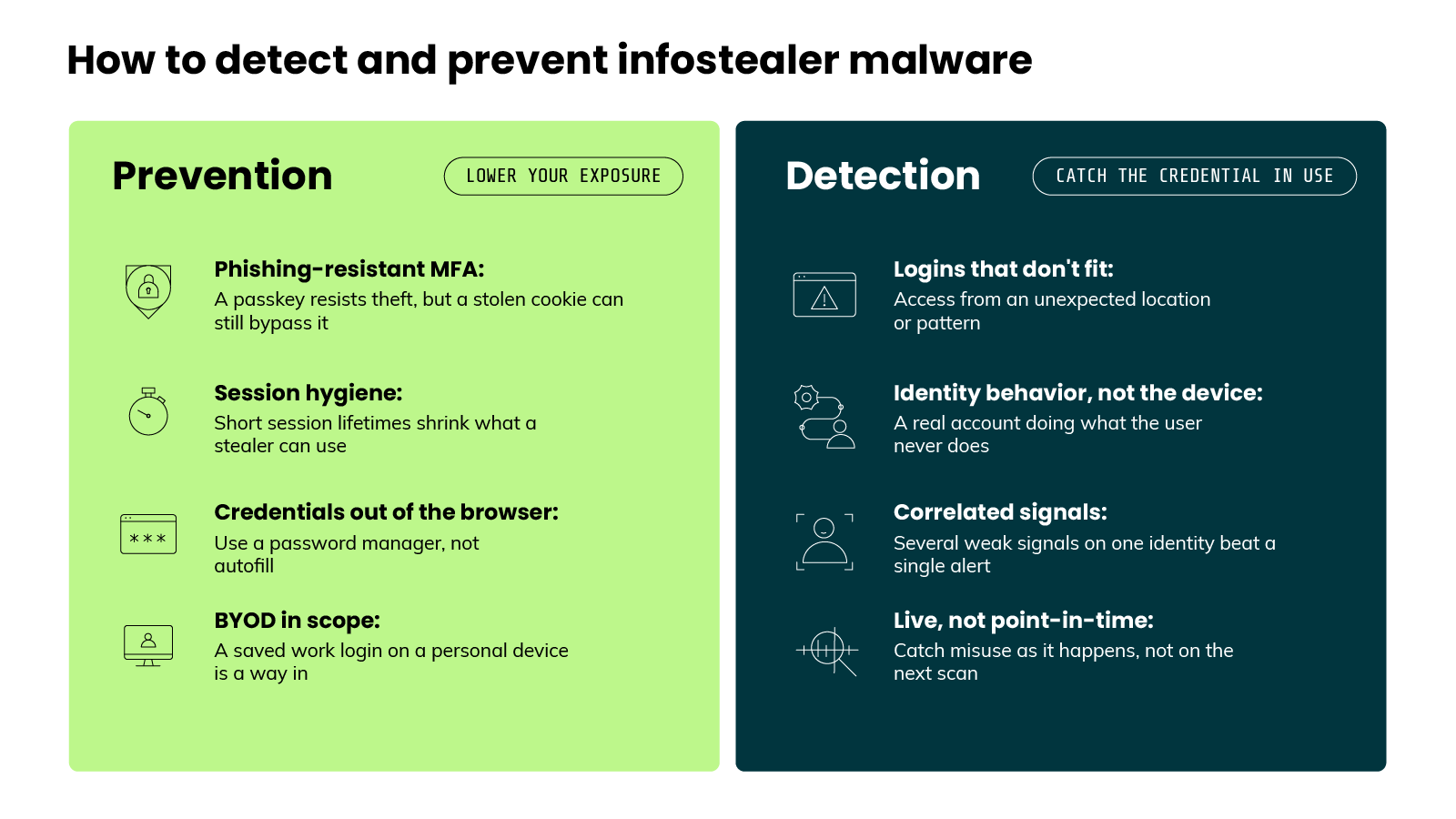
- Use phishing-resistant MFA
A passkey is the strong option here. Just know the limit: a stolen session cookie can sometimes bypass MFA entirely, so it lowers your risk without removing it. - Tighten session hygiene
Set short lifetimes on sessions and tokens. Sign out of services when you're done, and clear browser cookies at the end of a session. Each of these shrinks the value of whatever a stealer manages to grab. - Keep credentials out of the browser.
Skip autofill for anything sensitive and use a dedicated password manager instead. And don't store work credentials in a personal tool. - Treat BYOD as in-scope.
Many infections land on personal, unmanaged machines, and a saved work login on a home laptop is a direct path into the business. So device policy is part of infostealer defense, not a side issue.
Detection: catch the stolen credential in use
Prevention alone won't stop every infection. And by now you know why the aftermath is so hard to catch. The malware is already gone, and the stolen login looks legitimate. So the malware isn't the reliable signal. The misuse is.
Which means you have to assume some credentials are already stolen, then watch how identities behave rather than just what happens on the endpoint.
Here's what that looks like in practice:
- Watch for logins that don't fit.
Access from an unexpected location or IP address. A sign-in that breaks the user's normal pattern. One odd login on its own is just noise. Correlated with other signals, it's an early warning. - Watch identity behavior, not just the device
A stolen credential shows up as a real account doing things the real user never does. Broad enumeration of cloud resources. Unusual permission use. Access to data that account has no reason to touch. That behavior is the tell.
Pro tip: Service accounts and automation tokens get stolen too, and they have no "normal login" to deviate from. Baseline machine identities, not just people.
- Correlate signals instead of chasing single alerts.
One suspicious event rarely proves a breach on its own. The stronger signal is a combination on the same identity: a risky permission, a suspicious IP, and a high-confidence detection together. That pattern is what marks an account as potentially compromised and worth investigating. - Detect it live, not after the fact.
This is the whole point of timing. A point-in-time scan runs, then moves on. The abuse of a stolen identity is happening right now. In one documented case, an automation job left a database password in a shell script, and runtime monitoring flagged the exposure in real time, before it ever reached production. A scan on a fixed schedule would have missed that window.
Pro tip: A credential often shows up in a stealer log before it's used. That gap is your window to rotate and invalidate ahead of the attacker.
- Respond by cutting off access.
Once you confirm a compromised account, recall the point from earlier. A password reset isn't enough on its own. You also have to invalidate the active sessions and revoke the stolen keys.
Pro tip: A password reset doesn't always kill live sessions. Some apps keep a token valid until it expires on its own. Test global sign-out before you trust it.
Here's the core of it.
Infostealers turned a malware problem into an identity problem. Prevention lowers your exposure. But the durable defense is watching what stolen identities actually do, in real time, in the systems where the damage happens.
→ Continue learning:
- What is Runtime Security?
- What is Cloud Detection and Response (CDR)?
- What is CIEM (Cloud Infrastructure Entitlement Management)?
Infostealer malware FAQs

Blueprint: Runtime-Powered Cloud Defense