How to Prevent Software Supply Chain Attacks at Every Stage
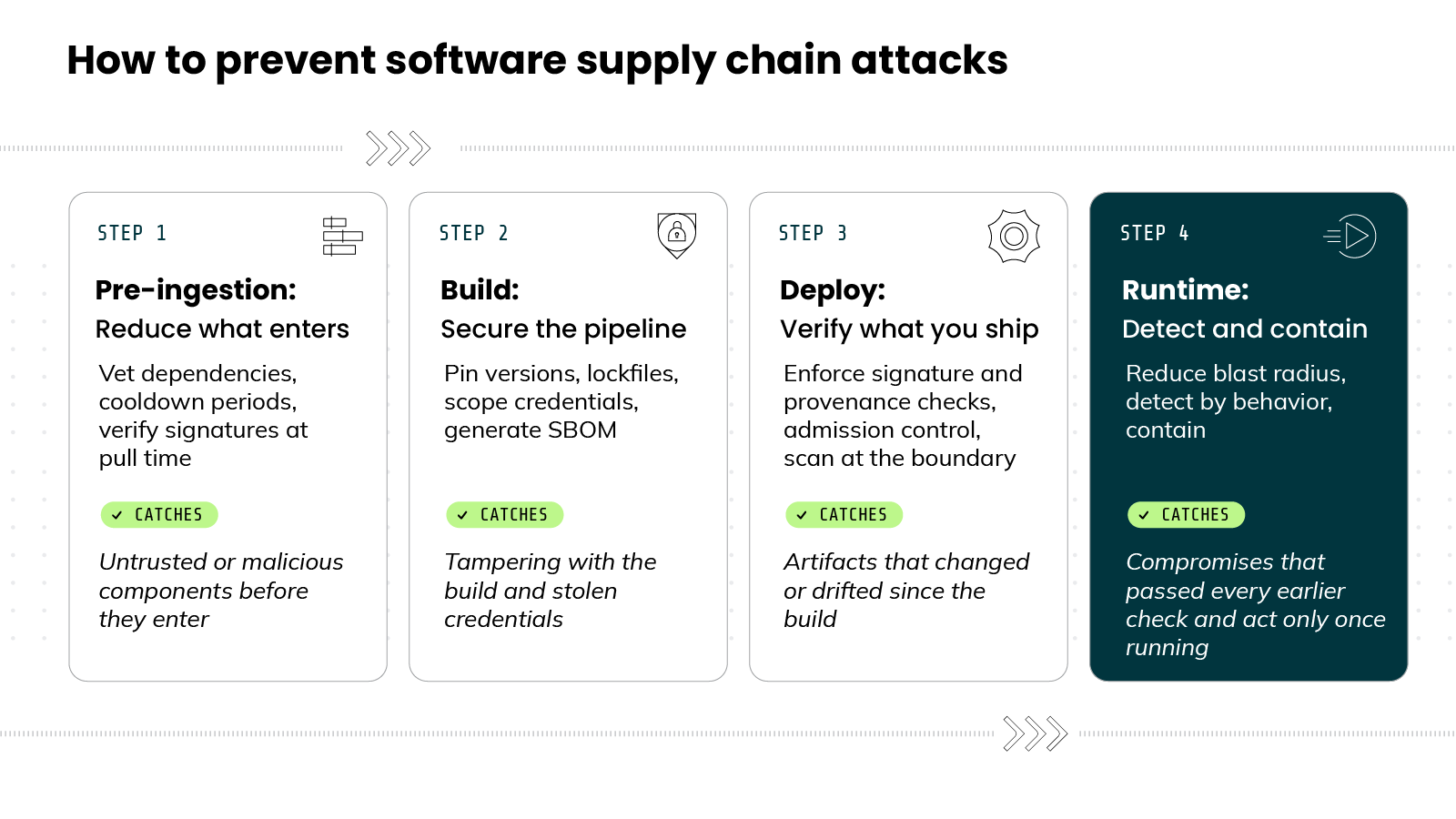
Preventing software supply chain attacks involves applying controls across four stages of the software lifecycle.
Dependency vetting limits which external components enter an environment. Build controls protect the pipeline and its secrets. Signature and provenance checks verify each artifact before release. Runtime monitoring catches and contains compromised components that earlier stages miss.
%201.svg)


- Supply chain attacks hit through your dependencies, not your perimeter. No single control stops them.
- Defense runs across four lifecycle stages: pre-ingestion, build, deploy, and runtime.
- Prevention lowers the odds but never hits zero, so runtime detection and containment are non-negotiable.
- Recent worms (Shai-Hulud and its variants, attributed to the TeamPCP threat actor) self-replicate and act after install, which is why watching what code does beats scanning for what it is.

Stage 1 - Pre-ingestion: Reduce what enters your environment
Most supply chain compromises start with a component you chose to bring in. A package. A library. A base image.
The first place to stop an attack is before that component reaches your pipeline.
Why? Once malicious code is inside, you have to catch it. Before ingestion, you can simply keep it out.
That's what pre-ingestion controls do. They reduce what enters your environment. Fewer untrusted components, fewer ways in.
Three practices do most of the work here.
1. Vet dependencies and suppliers.
Judge a component before you adopt it.
Every dependency is a decision. You're trusting code written and maintained by someone else.
Research on supply chain "weak link" signals points to a few that reliably flag a riskier open source project:
- An expired maintainer domain. If a maintainer's email domain has lapsed, an attacker can buy it and take over the account.
- Too many maintainers. Each one is a separate target for social engineering.
- An overloaded maintainer. Someone stretched across many projects is more likely to miss malicious code in a pull request.
- An unmaintained package. Abandoned projects get patched slowly and stay compromised longer.
- Install scripts. Code that runs automatically on install is a direct execution path for an attacker.
One more control belongs here. Configure your package managers to prioritize your private registry over public ones. That single setting blocks dependency-confusion attacks, where an attacker publishes a public package with the same name as your internal one and a higher version number to trick the resolver into pulling theirs.
FYI: You don't need to vet everything equally. A critical dependency deserves more scrutiny than a minor one. Effort should match the risk.
2. Use cooldown periods before adopting new versions.
Let a new release age before you trust it.
New versions carry risk. A compromised release, though, usually doesn't last long.
Here's why that matters. Most malicious npm packages are identified and removed within hours of publication. The window is short.
So wait it out. A cooldown period holds a new version for a set time before anything adopts it automatically.
This isn't theoretical. In the March 2026 Axios compromise, the poisoned versions were live only a few hours before they were caught and pulled. A cooldown of even a few days would have kept them from being adopted automatically. They'd have aged out before reaching a single build.
And the tooling already exists. Every major Node.js package manager now supports release-age gating. npm, pnpm, Yarn, Bun, and Dependabot each let you hold newly published versions for a set window, with the option to exempt packages you trust.
The payoff is large for the cost:
- Other people hit the malicious release first.
- It gets flagged and pulled before you pull it.
- You give up almost nothing. A version three days old is rarely worse than one released this morning.
Pro tip: Don't treat publishing history as a safety signal on its own. Attackers manufacture it. In the Axios attack, the malicious helper package was seeded with a clean version 18 hours in advance, purely to avoid looking brand-new to scanners. And the poisoned axios versions themselves came from a hijacked account with a genuine, years-long track record. A cooldown doesn't care about either, which is exactly why it works.
3. Verify provenance and signatures at pull time.
Confirm the component you received is the one you vetted.
Vetting and verification solve two different problems. Vetting tells you a component is worth trusting. Verification tells you the component you received is the one you vetted. You need both.
Provenance is the record of where a component came from. Where it was built. When. How. Verifiable provenance is difficult for an attacker to forge.
A signature covers the other half. It proves a component wasn't altered after signing. The catch is enforcement. Research on real incidents found weak or skipped signature verification was a factor in a large share of attacks. A signature only helps if something actually checks it.
So make the check non-optional:
- Accept only signed components.
- Validate the signature before use.
- Do both at pull time, the moment a component crosses into your environment.
Pro tip: Make npm ci --ignore-scripts your CI default. It blocks postinstall hooks, the exact path the Axios payload used. Then allow-list the few packages that genuinely need install scripts.There's one more control that acts at the exact point of entry. Those install scripts from the vetting signals? Many package managers run them automatically the moment a dependency installs. That's the path the Axios attacker used. The malicious helper ran its payload from a postinstall hook, before anyone imported a line of it. Disabling install scripts in automated builds shuts that path off. It's a one-line policy that closes the most direct route from downloaded to executing.
FYI: Pre-ingestion won't catch everything. Some compromised components are signed, well-maintained, and look legitimate. That's expected. The goal of this stage is narrower: reduce what enters, so every stage that follows has less to handle.
Stage 2 - Build: Secure your pipeline and credentials
Stage 1 controls what you let in. Stage 2 protects what happens next.
Your build pipeline takes trusted components and turns them into something you ship. Compromise it, and you sign and ship malicious code yourself. The build is where you become the attacker's distribution channel.
That's why it's a target. An attacker who reaches your pipeline can alter your software after it passed every earlier check.
Five practices harden this stage:
1. Pin every dependency to an exact version
Lock to specific content, not a moving label.
A version tag isn't a security boundary. Tags can move. The same tag can point to different content tomorrow than it does today.
A digest can't move. It's a cryptographic hash of exact content. Pin to it, and you get the same bytes every time.
- Pin container images by digest, not by tag.
- Pin source dependencies by commit SHA, not by branch.
- Pin third-party CI actions to a full commit SHA.
- Remove loose version ranges from package files.
Pin only what you've catalogued, though. You can't pin an action you didn't know was running.
Pro tip: Pinning has a ceiling. The median project carries around 150 transitive dependencies, and past a few hundred, hand-pinning creates more maintenance risk than it removes. Automate it, or pin what matters and lockfile the rest.
2. Lock and verify dependencies in CI
Make the build fail when the code changes underneath you.
Pinning handles the components you named. A lockfile handles how they're resolved.
Here's the difference.
When you install, a resolver decides which exact versions to fetch. Loose version constraints give it room to choose, and an attacker can exploit that room to steer it toward a malicious version you never intended. A lockfile removes the choice. It records the exact version and hash of every dependency, and a clean install fails the build when what's available doesn't match what's locked.
That mismatch matters. It means the code you're about to build isn't the code you approved. Treat it as a signal, not a nuisance.
3. Scope credentials and isolate builds
Limit what a compromised step can reach.
Build pipelines hold secrets. Signing keys. Registry tokens. Cloud credentials. Anything a workflow step can reach, an attacker who compromises that step can reach too.
This isn't hypothetical. In the March 2026 TeamPCP campaign, attackers breached the open-source scanner Trivy, then used credentials stolen in that compromise to clone what appeared to be more than 300 of Cisco's source-code repositories. One foothold, one set of stolen credentials, enormous reach.
So narrow the access:
- Give each job only the credentials it needs.
- Scope them to the tightest permissions that work.
- Prefer short-lived tokens over long-lived ones.
- Keep secrets in a manager, not scattered across workflow files.
Then isolate the work. Run builds in clean, ephemeral environments and destroy them afterward. And protect the source itself with branch-protection rules that block force pushes and deletions that stop an attacker from rewriting history or quietly removing code.
The goal is blast radius. If a scanning step can reach your deployment keys, that's not a scanning problem. It's a blast radius problem.
Pro tip: Assume any secret reachable during a build is already exposed the moment a step is compromised. That's why short-lived tokens beat scoping alone. A stolen credential that's already expired is worth nothing.
4. Generate an SBOM at build time
Know exactly what you shipped, before you need to.
An SBOM is a software bill of materials. It lists every component in what you built.
Generate it during the build. That's when you have the most accurate view of what actually went in.
Why bother? When the next compromise drops, the first question is always the same. Are we affected?
With an SBOM, you check build metadata and answer in minutes. Without one, you're inspecting live production to find out what's running. By then you're already behind.
5. Protect developer endpoints
Treat the laptop as part of the pipeline.
Your pipeline is only as trusted as the machines feeding it. This is where many of these attacks actually start.
The reason is access. A developer laptop holds credentials, source access, and signing material. Compromise one, and an attacker inherits whatever that developer can reach, including the build itself.
This is exactly what the recent wave of npm worms is built to do. They harvest tokens, keys, and session data from developer machines:
- Stolen tokens let attackers push code as a trusted developer.
- Stolen keys let them sign artifacts that look authentic.
- Stolen sessions let them skip authentication entirely.
So treat endpoint security as supply chain security. Extend detection to developer machines and CI runners. And watch the extensions and agent tools running with developer permissions. Most marketplaces don't re-review them after the first publish.
Each control assumes the others hold. A hardened build won't save you from a component you trusted in Stage 1. And it can't see a compromise that only wakes once the software runs.
That's what Stage 3 addresses. Before anything ships, you verify it.
→ Continue learning:
- What Is a Software Bill of Materials (SBOM)?
- CI/CD Security: Securing Your CI/CD Pipeline
- What Is Secrets Management?
Stage 3 - Deploy: Verify what you ship
Stage 2 produced an artifact. Stage 3 is about what happens between building it and running it.
That gap is a boundary. On one side, code you built and approved. On the other, code running in production. Deploy is the last automated checkpoint before that line gets crossed.
Here's the pattern behind most of these compromises. Trust gets assumed where it should be verified. A team trusts a tag because the name looks familiar. They trust an artifact because it came from the usual place.
Deploy-time verification closes that gap. It confirms the thing about to run is the thing you actually built.
Three checks do the work.
1. Enforce signature and provenance checks before promotion
Re-verify the artifact at the moment it moves toward production.
Promotion is the moment an artifact moves toward production. Staging to prod. Registry to cluster. That's the right place to check.
You already verified at pull time, back in Stage 1. Check again here. The artifact has moved through your pipeline since then, and the stakes are higher now.
Confirm two things before you let it through:
- The signature. It proves the artifact wasn't altered after it was built.
- The provenance. It records where the artifact came from, when, and how it was built.
Provenance only helps if it's hard to fake. So it should be generated by the build system itself, not added later by hand. This is the idea behind verifiable build attestations. They tie an artifact back to the exact build that produced it, which an attacker can't easily forge.
No valid signature, no verified provenance, no promotion.
2. Gate deployments with admission control
Make the check impossible to skip.
A check only matters if it can't be skipped. Admission control is the gate that enforces it.
It sits at the deploy boundary and inspects what's trying to run. It admits what meets policy. It rejects what doesn't.
Here's why the gate matters, not just the check. Without enforcement, signature and provenance checks are optional. And optional checks get skipped under deadline pressure.
The gate removes that choice. Verification becomes the default, applied to everything, every time. A person in a hurry can't wave an artifact through.
3. Scan artifacts at the deploy boundary
Catch what changed since the build.
Pre-ingestion scanning catches what's known at pull time. But time passes between build and deploy. New vulnerabilities surface. So scan again at the boundary.
This last scan does two jobs:
- It catches vulnerabilities disclosed after the artifact was built.
- It flags unauthorized components or exposed secrets that don't belong in the final artifact.
In other words, it confirms what you're about to ship still matches what you approved. Nothing was added. Nothing drifted.
The window you're defending is narrow, and that's the point. In the March 2026 Axios compromise, the malicious versions were live for under three hours before they were caught and pulled. That was enough to reach anyone who pulled and shipped in that window. A boundary check is the last automated chance to catch something that recent.
These checks share one limit. They verify an artifact before it runs. They can't see how it behaves once it does.
Some compromises stay quiet through every check here. They only act after deployment, when the code is live. That's the gap Stage 4 closes.
→ Continue learning:
- Using Admission Controllers to Enhance Kubernetes Security
- What Is Vulnerability Scanning? Benefits, Types, and More
Stage 4 - Runtime: Assume prevention fails, detect and contain compromise
Stages 1 through 3 all happen before your code runs. Each one checks what the software is.
But some compromises pass every check. They're signed. Well-maintained. They look legitimate. They run clean through every gate you built.
Then they execute. And the question changes from "is this safe?" to "what is it doing?"
That's Stage 4. It assumes prevention eventually fails, and plans for what happens next.
1. Patch by severity, not by calendar
Cadence is the weaker lever.
Here's the tension every team feels. Patch fast, and you risk pulling a compromised update before anyone catches it. Patch slow, and you stay exposed to known vulnerabilities longer. It can feel like one dial with no good setting.
But it isn't one dial. It's two policies.
Sort by severity. Anything remotely exploitable, actively attacked, and internet-facing gets patched now. A live zero-day on an exposed surface hurts you faster than a poisoned package will. Everything else waits in a soak window, long enough for other people to catch a bad release first.
Here's the deeper point. However you set the patch dial, you get hit eventually. Cadence is the weaker lever. The stronger one is blast radius. If a compromised component can only reach a little, both problems shrink at once.
Pro tip: Speed of fixes is a selection criterion, not just a patching one. Favor dependencies that ship security releases fast. Research ties a low mean-time-to-update to measurably better project security.
2. Reduce blast radius
Assume something gets through. Limit what it can reach.
Blast radius is how far a compromise can spread once it's inside. You saw the idea in the build stage, applied to credentials. At runtime, it's the whole game.
So assume something gets through. Then ask one question. What can it reach?
The goal is to make that answer small. And you set these limits in advance, before anything is compromised:
- Scope identity tight, so a compromised component can't move laterally to things it never needed.
- Segment the network, so one workload can't reach the whole estate.
- Control egress, so a backdoored component can't quietly phone home.
That last one isn't abstract. In the Axios compromise, the malicious code's whole job was to call out to an attacker's server. Egress control is exactly what stops that call from connecting.
A component limited to the few things it genuinely needs can't do much damage, even when it turns malicious. The win is that one compromise costs you a single segment instead of the whole estate.
3. Detect at runtime, not just in the scan
Watch what the code does, not just what it is.
Every scan so far asks the same question. Does this match something known to be bad?
That works for known threats. It misses new ones. A freshly published malicious package matches no signature. It can pass every scan and still be hostile.
Runtime detection asks a different question. Not what is this, but what is it doing?
Here's why that matters. A compromised component has to act to cause harm. It makes a network call it never made before. It spawns an unexpected process. It reaches for credentials it has no reason to touch. That behavior shows up at runtime, even when the component itself looks clean.
This is exactly how the Axios compromise was caught. Behavioral monitoring flagged an outbound connection to an attacker's server during a routine CI run, marked as anomalous because it had never appeared in any prior run. The package looked clean. Its behavior didn't.
So behavior-based detection can flag a compromise regardless of how it got in. Zero-day or poisoned update, the abnormal action looks the same once it runs.
There's a second advantage, and it's the bigger one. Runtime detection is grounded in what's actually executing. Not what might be present. What's running, right now. A scanner flags every known flaw in everything you pulled, whether it's reachable or not. Runtime narrows the picture to what's truly in use and actually behaving abnormally.
In other words, it cuts the noise. And a precise signal is one a team can act on, instead of one more alert in a pile of thousands.
Pro tip: Behavioral detection works because it needs no prior knowledge of the threat. The Axios callback was flagged for being new, not for being known-bad. That's the one method that catches a zero-day and a poisoned update the same way.
4. Contain what you detect
Stop a compromise before it spreads.
Detection tells you something is wrong. Containment is what you do about it.
The two halves of this stage work together. Blast radius sets the walls in advance. Detection spots the compromise in the act. Containment then stops it spreading further than those walls allow.
In practice, that means acting fast and narrowly:
- Isolate the affected workload from the rest of the environment.
- Cut its network access, so it can't reach out or move sideways.
- Preserve what happened, so you can trace how far it got.
Speed is the whole point here. The recent worms self-replicate. One infection seeds the next with no human in the loop. Against something spreading on its own, the difference between containing one workload and losing the estate is how fast you cut it off.
This is also where an incident response plan earns its keep. Some attacks get through no matter what you build. Knowing in advance how to isolate a workload, revoke its access, and trace the damage is what keeps one compromise from becoming a full breach.
→ Continue learning:
- What Are Runtime Insights?
- What Is Container Threat Detection?
- What Is Container Forensics and Incident Response?
That's the full picture. Four stages, each covering what the others can't.
Prevention reduces the odds. It never makes them zero. So you assume a compromise will run. You limit what it can reach. You watch for it in the act. And you contain it when it appears.
No single stage is enough on its own. Together, they're how you keep a software supply chain attack from becoming a breach.
→ Continue learning: 7 Software Supply Chain Security Best Practices in 2026
Why are software supply chain attacks accelerating?
Software supply chain attacks are accelerating because three forces now compound each other: attacks that self-replicate, packages popular enough to hit thousands of victims at once, and attack tooling that's gone open-source. Each lowers the effort or raises the reach of the next.
For years, a major supply chain compromise was a rare, headline event. Now they arrive in clusters, month after month.
Let's dig into the forces that explain the shift.
The first is self-replication.
The most disruptive recent attacks weren't single break-ins. They were worms.
Take Shai-Hulud. It was the first documented self-replicating worm to hit the npm registry. Once it infected a package, that package spread the worm to others its maintainer touched, with no further attacker effort. Because npm packages depend on each other so heavily, it became hard to predict who would be compromised next. Within a short window, hundreds of packages were affected.
It didn't stop with one variant. A smaller strain, Mini Shai-Hulud, surfaced afterward and hit other projects. It then expanded into the Go ecosystem and targeted CI workflows. One worm becomes a family.
The second force is leverage.
One compromised package can reach everyone who depends on it.
The Axios compromise made this concrete. Axios is one of the most widely used HTTP libraries in the world, pulled over 100 million times a week. Two poisoned versions were enough to threaten anyone who installed in the wrong window. Attack one widely used package, and the blast radius is enormous before anyone notices.
The third force is that the tools are spreading.
After running its worm campaigns, the group behind them, tracked as TeamPCP, released an open-source version of the worm. Predictably, copycat attacks followed.
Here's why that matters.
When a working attack becomes a public template, the barrier to entry drops. More attackers can run the same playbook. The same group has also moved across ecosystems and tools, breaching a popular open-source scanner and using stolen credentials to reach hundreds of private repositories.
There's a through-line worth naming. Every one of these attacks does its damage after the package is installed and running.
The worm spreads at install time. The poisoned axios versions called out once they executed. That's why prevention alone can't be the whole answer, and why the runtime stage matters as much as the three before it.
How do attackers compromise the software supply chain?
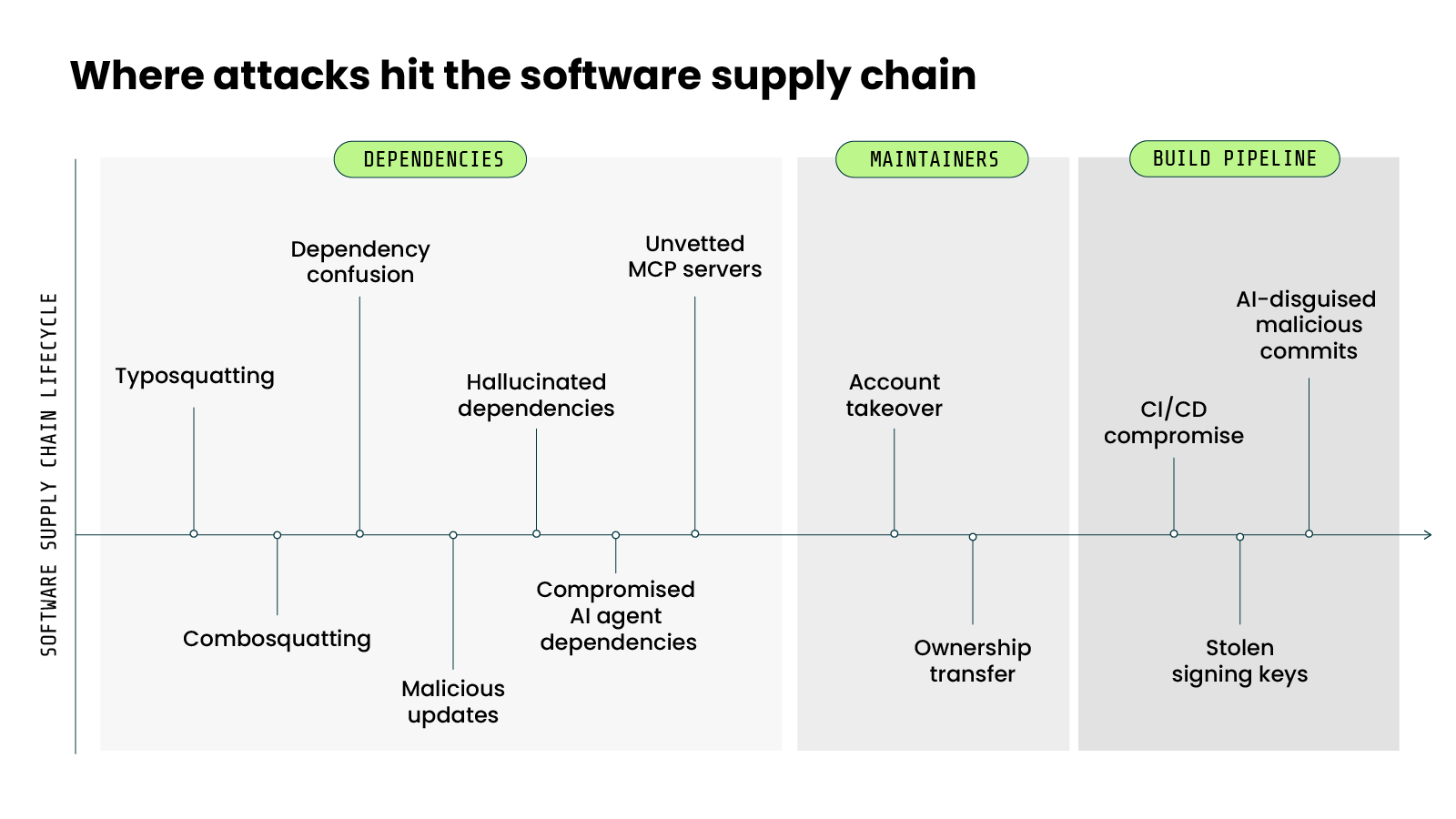
Prevention makes more sense once you know what you're defending against. Attackers don't have one way in. They have several, and they map to different points in the lifecycle.
Here are the main ones.
Dependency-level attacks
Trick you into pulling the wrong package.
This is the most common entry point. The attacker doesn't breach you. They get you to install their code yourself.
A few techniques do most of the work:
- Typosquatting. The attacker publishes a malicious package with a name that's a near-miss for a popular one. A single wrong letter, and you've installed theirs. One real case used the name "loadsh" to impersonate the widely used lodash.
- Combosquatting. A variation on the same idea. The attacker adds a common prefix or suffix to a real package name, so it still looks legitimate.
- Dependency confusion. This one exploits how resolvers work. If you use a private package that doesn't exist in public registries, an attacker can publish a public package with the same name and a higher version number. The resolver sees the higher version and pulls theirs instead of yours.
- Malicious updates. A package you already trust ships a poisoned new version. You vetted the project once. The update slips through because you weren't looking again.
Account and maintainer takeover
Become the trusted publisher.
Why impersonate a package when you can take over the real one?
Account takeover is exactly that. The attacker hijacks a maintainer's account, often through a weak or reused password, missing multi-factor authentication, or a stolen session. Then they publish malicious releases under a trusted name.
There's a related move. Ownership transfer. Here the attacker convinces a maintainer to hand over publishing rights, sometimes by posing as a helpful volunteer. Once in, they remove the others and take control.
These attacks do have a built-in limit. The community often catches a hijacked package within hours, which caps how much damage one takeover can do.
Build and CI/CD compromise
Poison the software while it's being made.
The earlier attacks target what goes in. This one targets the factory itself.
Your build pipeline turns a trusted source into a shipped artifact. Compromise it, and the attacker alters your software after it passed every earlier check. Worse, they can reach your signing keys. With those, they sign malicious code that looks completely authentic.
How do they get in? Insecure pipeline infrastructure. Signing keys stored on shared build servers. Credentials that let an attacker move laterally from a low-value step into the signing system. Once they're in the build, the trust you've built into everything downstream works in their favor.
AI-era vectors
New surface, same trust problem.
AI development tools introduce attack surface the older playbooks didn't have.
Start with the agents themselves. AI coding agents install packages, pull dependencies, and run with developer-level access.
A compromised package an agent pulls has the same reach as one a developer pulls. The difference is that the people using these agents may not recognize suspicious behavior.
Then there's a stranger vector. Hallucinated dependencies.
Code-generating models sometimes invent package names that don't exist. Attackers have caught on. They register those hallucinated names in public registries and wait. The next developer whose AI assistant suggests the same non-existent package installs the attacker's code instead. Researchers have a name for it: hallucination hijacking.
There are also MCP servers. These connect AI agents to tools and systems, often with broad permissions.
They're a new kind of dependency, and an unvetted one is a new way in. Compromised MCP-related packages have already shown up in the wild.
And there's the content these tools produce.
Recent campaigns have used AI-assisted code to disguise malicious commits as routine changes, making them harder for a human reviewer to flag.
→ Continue learning:
What's the difference between a software supply chain attack and third-party vendor risk?
These two terms get used interchangeably. They shouldn't be.
They describe different problems. They have different attack surfaces. And they call for different defenses.
Here's the distinction.
Third-party vendor risk is about the companies you do business with.
A SaaS provider. A payment processor. A managed service. You hand them access or data, and their security becomes part of yours. If they get breached, you can get breached through them. The defense is procurement and oversight. You assess their security posture before you sign, and you monitor it after.
Software supply chain risk is about the code inside your software.
An open source package. A library. A dependency three levels deep that you never chose directly. You didn't sign a contract with its maintainer. You may not even know it's there. The defense is technical. You vet, pin, verify, and monitor the components themselves.
In other words:
One is about who you trust to run services. The other is about what you pull into your build.
Here's how they compare.
The two do overlap. A third-party vendor can ship you compromised software, which is both a vendor problem and a supply chain problem at once. But the overlap is exactly why the distinction matters. You need both kinds of defense, because either gap can sink you.
The data shows both rising. On the vendor side, third-party involvement in breaches has climbed steeply. It doubled from 15% to 30% in the Verizon 2025 Data Breach Investigations Report. It then jumped another 60% in the Verizon 2026 Data Breach Investigations Report, which now finds a third party involved in 48% of all breaches. On the dependency side, malicious open source packages have surged across registries, driven by the self-replicating worms and copycat campaigns covered earlier.
Software supply chain attack prevention FAQs
Blog: TeamPCP expands: Supply chain compromise spreads from Trivy to Checkmarx GitHub Actions