



Get security briefings from the Threat Research Team
New campaigns, attacker techniques, and detection guidance — straight to your inbox.

Falco Feeds extends the power of Falco by giving open source-focused companies access to expert-written rules that are continuously updated as new threats are discovered.
Runtime security serves as a last line of defense to cover posture gaps.
Imagine a public-facing web application. An attacker could use a software bug to gain initial access, then move laterally and escalate privileges to access the rest of your cloud infrastructure. Or, think about stolen credentials. One of your developers used their work laptop to download a Minecraft mod for his son. However, he instead downloaded malware that stole cloud credentials. Now the attacker has access through the main door.
Although posture helps enforce best practices, it is blind to ongoing threats. That’s where runtime security chips in.
Let's briefly introduce you to runtime security, uncovering how Falco works its magic and how easy it is to get started with Falco.
What is runtime security?
Runtime security is the protection of workloads once they are in execution. It acts as a safety net, covering for security risks that posture cannot detect. This includes:
- Zero-day vulnerabilities, or issues previously unknown to a software creator.
- Privilege escalation attempts.
- Bugs that cause erratic behavior or resource leaking.
Runtime security software acts similarly to an antivirus, observing everything that is happening in the system and triggering alarms when suspicious activity occurs.
An attacker can exploit a software vulnerability not yet known to the public to gain initial access to a container. Then, they can use misconfigurations to move laterally and escalate privileges. If you rely only on mitigating known vulnerabilities and on compliance, you are blind to these attacks. If you want to learn more, we covered a similar scenario in Cloud lateral movement: Breaking in through a vulnerable container.
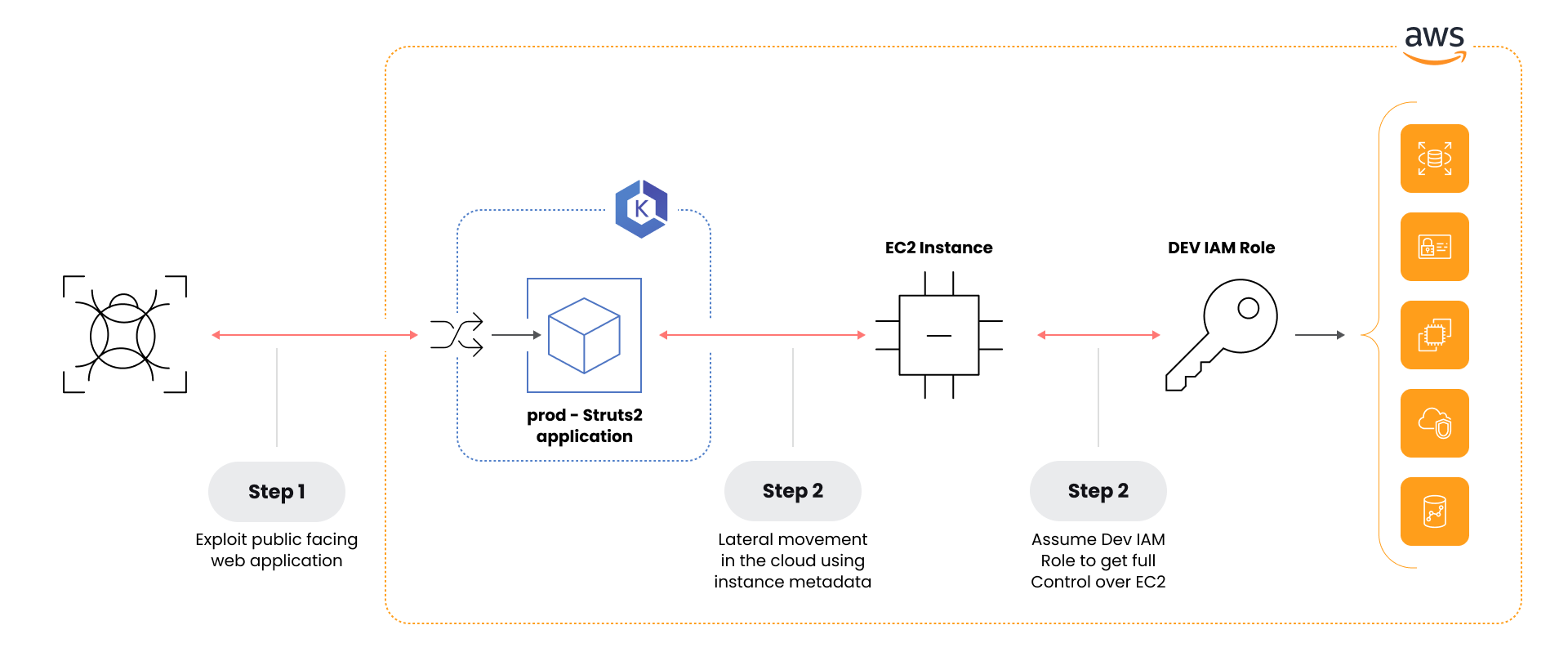
A runtime security tool like Falco will detect suspicious network connections on the container and suspicious behaviour in the cloud account, triggering an alarm that gives you a chance to contain the attack. Falco will also include cloud-native context in each alert to help you identify the source of the alert and correlate multiple alerts to understand the scope of the attack.
We’ve observed the use of AI to assist, speed up, and customize attacks. Runtime is more unpredictable than ever, so posture and best practices alone are not enough; you need solid runtime security as a safety net.
Runtime security for cloud and containers
Cloud-native workloads are a mix of moving pieces, and it’s challenging to gain visibility into all of them.
Let’s cover the main elements and how to implement runtime security on them.
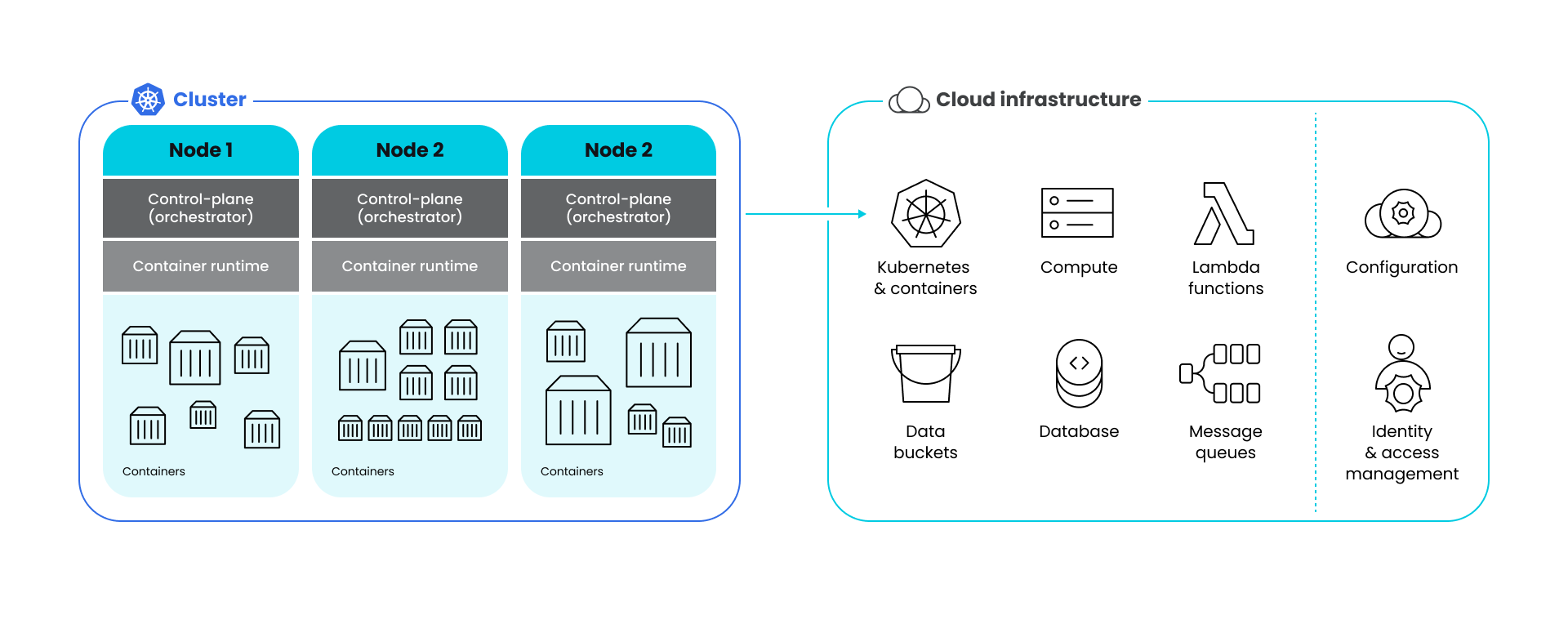
Container workloads are made of:
- Containers: Your workloads, running in sandboxes.
- Container runtime: The process on a server executing the containers and interfacing with the host resources. Examples: containerd, CRI-O, podman, Docker.
- Orchestrators: A combination of tools that deploys and manages containers across a cluster of servers. Examples: Kubernetes, OpenShift, Docker Swarm.
- Nodes: Each of the servers that comprises the cluster and hosts its components.
Cloud workloads may contain containers, but also include:
- Servers: Good old virtual machines where you can run whatever software you want. Examples: AWS EC2, GCP Compute Engine.
- Serverless workloads: Services where you can run software without managing the server underneath. Examples: Lambda functions, AWS Fargate, Google Cloud Run.
- Managed services: Databases, storage, firewalls, networking, message queues, and other services you configure and use, but don’t manage at a low level.
With a special mention to the configuration and access management of all these services, which are often two entities in themselves.
To implement runtime security for cloud-native environments, you can use a combination of:
- Agents on cluster nodes and compute units. They keep track of everything happening in the system through a mix of strategies, such as kernel instrumentation to read system calls or using the orchestrator API to tap into logs.
- Sidecars on serverless workloads where kernel instrumentalization is not available, but alternatives like ptrace or LD_PRELOAD are.
- Agentless services that use the cloud provider’s API to tap into the audit log. They can also use the API to perform response actions, such as quarantining an account or stopping a workload.
Falco is the most popular OSS cloud and container runtime security tool. As such, its ecosystem has tools to implement all the above.
How does Falco work?
Falco is a cloud-native security tool that provides runtime security across hosts, containers, Kubernetes, and cloud environments.
Falco provides deep visibility by analyzing events from multiple sources. On one side, it fetches kernel system calls from the host system; on the other, it receives events via Falco plugins that can tap into audit logs from Kubernetes, cloud providers, and even SaaS services like GitLab, Box, or Salesforce. Check the list of registered plugins.
Equally important, Falco adds context to its findings, helping DevOps, security, and cloud teams understand exactly who did what and where. This context is key when trying to understand the scope of a security event.
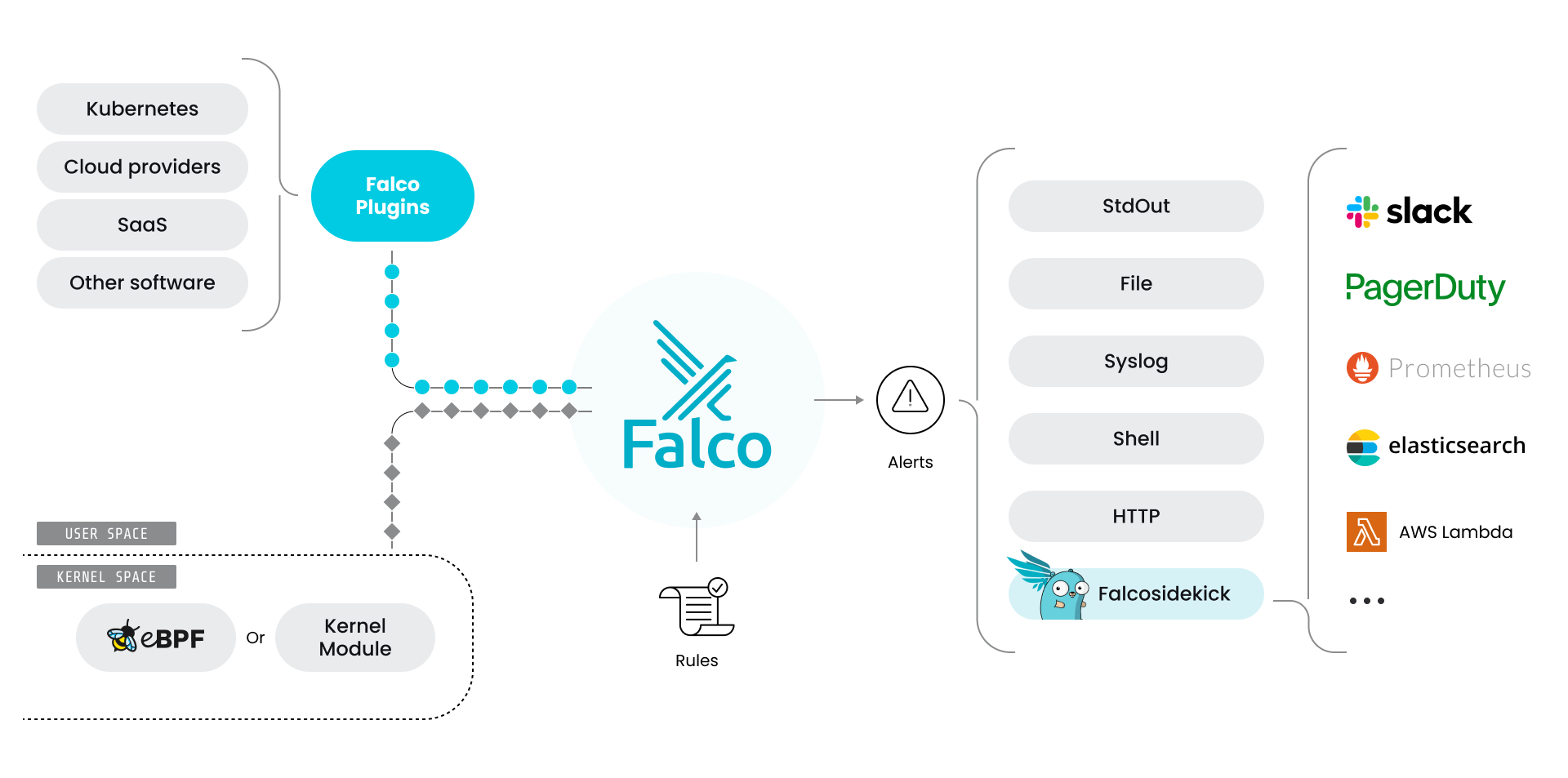
You can complement Falco’s detection skills with other tools in the ecosystem:
By default, Falco can send alerts to a limited number of channels. Falcosidekick expands Falco’s alert channels to known chat services like Slack, observability tools like Prometheus, alerting systems like Pagerduty, and more.
Also, Stratoshark lets you explore events from the desktop using a Wireshark-based interface.
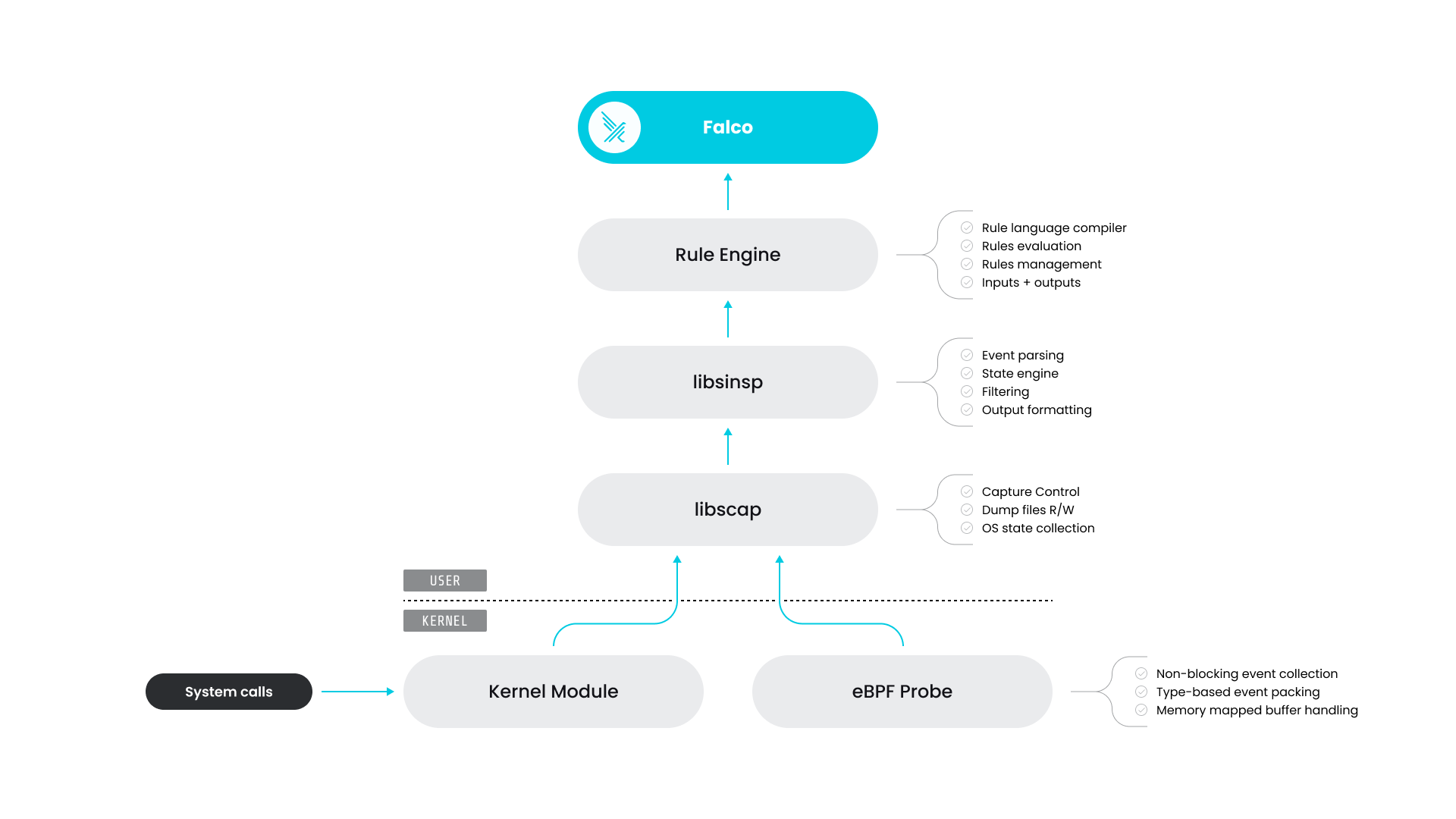
Falco architecture
Internally, Falco works at several levels:
- The Falco binary runs in userspace, parsing information from drivers and plugins, evaluating rules, and outputting alerts.
- The drivers gather system calls from the host. The Kernel module (default) and the eBPF probe run at the kernel level and can see everything that’s happening, while the userspace instrumentation can run with fewer privileges with limited visibility.
- Finally, the configuration defines how Falco runs, which rules to assert, and when to trigger alerts.
Falco rules
Falco evaluates events against rules and considers them suspicious if the condition is met.
For example, a bash spawn inside a container is unusual. The following rule would flag such events, focusing on how the condition looks for processes where proc.name is bash:
- rule: Detect bash in a container
  desc: You shouldn't have a shell run in a container
  condition: container.id != host and proc.name = bash
  output: Bash ran inside a container (user=%user.name command=%proc.cmdline %container.info)
  priority: INFO
When this rule detects an event, we will receive the message defined on the output property:
20:07:06.837415779: Notice A shell was spawned in a container with an attached terminal (user=root container=1dab04047700 shell=bash parent=runc cmdline=bash terminal=34816 container_id=1dab04047700 image=docker.io/falcosecurity/falco) container=1dab04047700And that's it! Using simple language, we can see runtime container activity and detect potential security events.
If you want to know more about Falco rules, take a look at the documentation rules.
Falco is a solid project
"Ok, ok, Falco is great," I hear you say. "But how solid is this project?"
And this is a reasonable question. After all, no one wants to commit to a solution only to migrate to something else a short time later. So here are some interesting facts to put things in perspective.
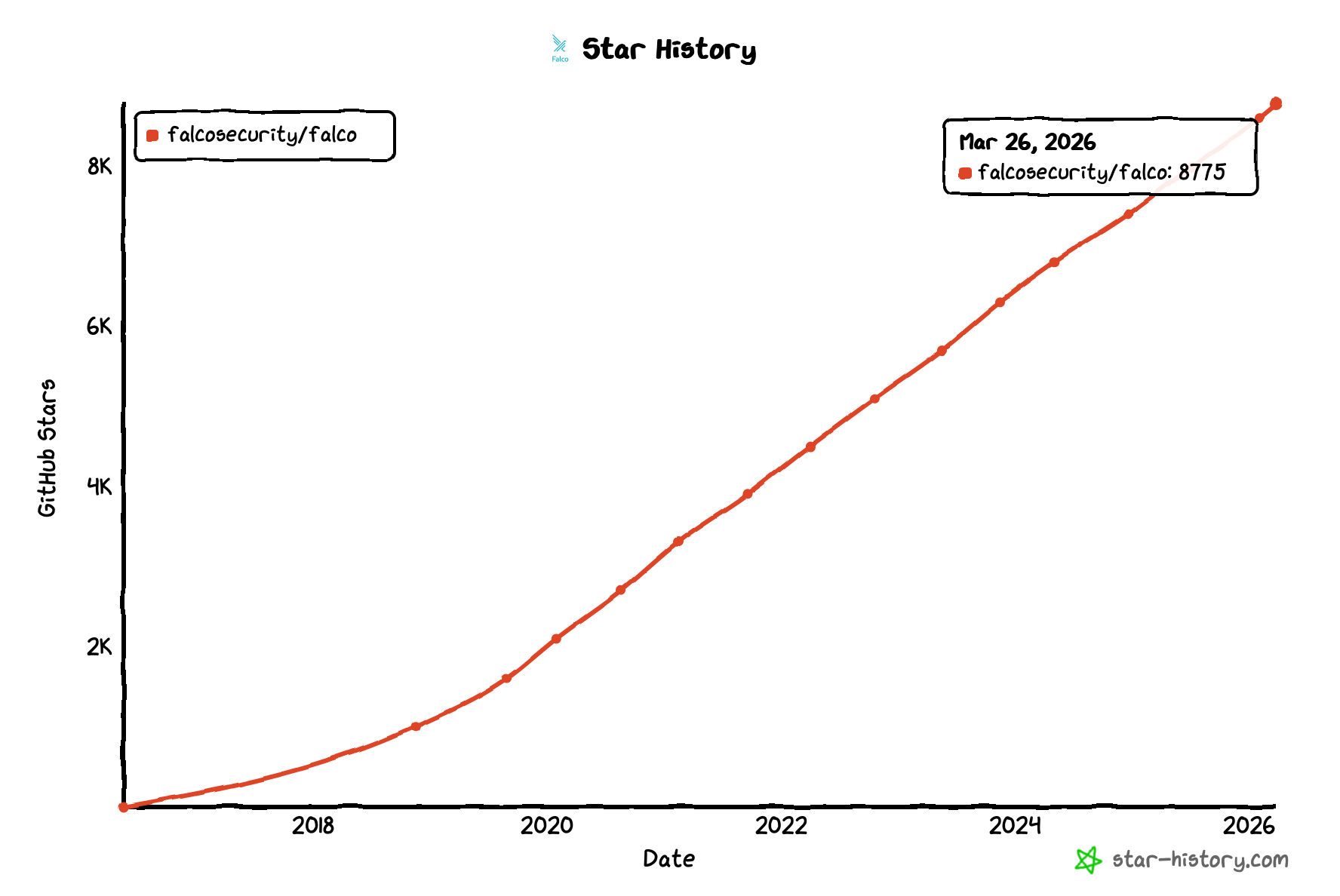
Falco adoption continues to grow, and its graduation from the Cloud Native Computing Foundation® (CNCF) in 2024 has only accelerated this trend. For example, the number of users following Falco's GitHub repo has quadrupled since incubation, keeping a constant pace.
Adoption is so ubiquitous that Falco is now part of the curriculum for the official CKS exam.
And for us, the icing on the cake is being recognized by Gartner. Among the reasons for using Falco, Gartner analysts note that "Falco enables detection of anomalous behavior in application deployments with Kubernetes context awareness." [1]
Falco is a strong project with a thriving community, and you should consider it a serious contender for your runtime container security needs.
First steps with Falco
Installing Falco on your Linux machine is fairly easy. In summary: Install the kernel modules, set up the repository, and then install the binaries with apt-get (on debian-based hosts).
However, in a cloud-native world, chances are that you don’t do bare metal installations and you use containers instead.
Let's cover how to install Falco in a Kubernetes cluster using Helm, Kubernetes' package manager, and how to customize the available rules.
Wait, I don't have a Kubernetes cluster to test this on!
Worry not! We have you covered.
Follow the instructions to install Minikube, and you'll get a single-node Kubernetes cluster in a matter of minutes.
Remember to start Minikube with:
$ minikube startAnd perform a quick test to confirm that it's up and running:
$ minikube kubectl -- get nodes
NAME       STATUS   ROLES                  AGE     VERSION
minikube   Ready    control-plane,master   6m18s   v1.22.2
From now on, we will assume the kubectl client is installed locally, so we can run kubectl get nodes without prepending minikube. Check the minikube kubectl documentation for instructions on creating an alias to simplify these commands, or install kubectl on your machine here.
Let's deploy Falco on Kubernetes with Helm
For this, make sure you have Helm installed.
We will use the community-supported chart to install Falco.
First, add the falcosecurity charts repository and update:
helm repo add falcosecurity https://falcosecurity.github.io/charts
helm repo update
Now, it's time to install Falco using the helm install command:
helm install --set tty=true falco falcosecurity/falcoWarning: Don’t use --set tty=false in production. We are using it to simplify the example and get an instant output later, but it overrides stdout buffering and causes serious performance issues. This is common behaviour in services; the stdout is meant for logging after all. In production, you would use other output channels or Falcosidekick, which don’t buffer and output alerts instantly.
Wait a few seconds for the containers to start, identify the Falco Pod, and have a look at the container logs:
$ kubectl get pods
`NAME READY STATUS RESTARTS AGE
`falco-467d7 1/1 Running 0 4m13s
$ kubectl logs falco-467d7
…
Wed Nov 3 15:05:17 2021: Falco initialized with configuration file /etc/falco/falco.yaml
Wed Nov 3 15:05:17 2021: Loading rules from file /etc/falco/falco_rules.yaml:
Wed Nov 3 15:05:17 2021: Loading rules from file /etc/falco/falco_rules.local.yaml:
Wed Nov 3 15:05:17 2021: Starting internal webserver, listening on port 8765
…
Looks like Falco was deployed successfully!
Putting Falco to the test.
Now that Falco is deployed and running, let's see if it can detect some suspicious activity.
Since containers are not meant to be accessed interactively, one of the biggest red flags of a compromised container is the spawning of a terminal shell. There are legitimate reasons for this to happen, but they are usually limited to troubleshooting tasks.
Falco ships with rules enabled by default to detect such scenarios. In this case, the relevant rule is "Terminal shell in container."
Let's take the same falco Pod we deployed earlier, and let's run some commands inside it:
$ kubectl exec -it falco-4gsbr -- /bin/sh
root@falco-4gsbr:/#
Note that this will work with any other Pod you have deployed; we are using the Falco Pod, since we know for sure you have it in your cluster 😉.
If we now check the Falco logs, we'll see a warning:
$ kubectl logs falco-4gsbr
…
Triggered rules by rule name:
16:37:58.199209616: Notice A shell was spawned in a container with an attached terminal (user=root user_loginuid=-1 k8s.ns=default k8s.pod=falco-4gsbr container=b1cfe2fbfcdd shell=bash parent=runc cmdline=bash terminal=34816 container_id=b1cfe2fbfcdd image=falcosecurity/falco) k8s.ns=default k8s.pod=falco-4gsbr container=b1cfe2fbfcdd
…
Notice how Falco provides contextual information about the pod and namespace where the event was triggered (k8s.ns=default k8s.pod=falco-4gsbr container=b1cfe2fbfcdd).
Next steps
Now that Falco is working, there's a lot of fun to be had.
Continue your journey with:
- This webinar: Getting started with container runtime security using Falco.
- The Falco community maintained hands-on labs.
- The Runtime Security and Falco 101 course by Sysdig.
- This Falco workshop, and these too.
You can also try integrating some Falco plugins:
- SaaS services like Gitlab, Box, or Salesforce.
- Track Bitcoin activity.
- Implement pet surveillance.
- Or, check the list of registered plugins.
You can also get familiar with other Falco projects:
- Set up Falcosidekick to forward events.
- Get started with Stratoshark in 5 minutes.
And, if you want to get involved with the Falco project:
- Get started at Falco.org.
- Check out the Falco project on GitHub.
- Get involved with the Falco community.
- Meet the maintainers on the Falco Slack.
- Follow @falco_org on Twitter.
Conclusion
Falco is a solid open source solution for implementing runtime security in containers, Kubernetes, and the cloud.
Falco's cloud-native design enables it to provide the context you need to quickly and effectively resolve the security events in your modern application environments.
[1] Gartner, "Open-Source Options for Threat Detection and Incident Response", Anna Belak and Eric Ahlm, 1 December 2020.
Sysdig Secure extends Falco with out-of-the-box rules and other open source projects, making it even easier to work with and manage Kubernetes security.